
ComfyUI TTS alternatives
Node-based text-to-speech and voice workflow stack inside ComfyUI using custom audio nodes.
This ComfyUI TTS alternatives guide compares pricing, strengths, tradeoffs, and related options.
ComfyUI TTS is included in this directory because it gives creators a flexible way to build repeatable speech synthesis pipelines with local or cloud compute.
Official site: https://www.comfy.org/
Company YouTube: https://www.youtube.com/@ComfyOrg
At a glance
| Pricing model | Free |
|---|---|
| Page type | Open-source project |
| Model source | 3rd-party models |
| Price range | Free (open-source) |
| Best for | Local custom voiceover pipelines, Experimental multi-model TTS workflows, Teams already using ComfyUI for image/video pipelines |
| Categories | For Creators , For Solopreneurs , For Small Business , Video , Text to Speech , Free AI Tools , Automation , Local LLMs |
Audio samples
Qwen3 TTS sample
TTS feature comparison
| Tool | Languages | Accents | Voice cloning | Voice changing | Local/offline | API access | Notes |
|---|---|---|---|---|---|---|---|
| ComfyUI TTS | Depends on selected custom node/model; multilingual support is available across several node packs. | Depends on voice packs and model families used by each custom node. | Partial | Partial | Yes | Partial | Best for advanced users who want node-level control over TTS pipelines. |
| Voxtral TTS | English, French, Spanish, Portuguese, Italian, Dutch, German, Hindi, Arabic. | Cross-lingual cloning and code-mixing are supported; accent and speaking style follow the reference voice prompt. | Yes | Partial | No | Yes | Strong fit for low-latency voice agents, branded voice workflows, and multilingual API-first narration systems. |
| Coqui TTS | Broad multilingual support across available Coqui-compatible models. | Accent support is available through model and speaker selection. | Yes | Partial | Yes | Yes | Strong flexibility for advanced custom speech systems. |
| Piper TTS | Multi-language support via community and packaged voice models. | Accent availability depends on installed voice packs and language models. | No | No | Yes | Partial | Best for offline, scriptable, low-cost narration pipelines. |
| Kokoro TTS | Multilingual capability depends on selected checkpoints and runtime implementation. | Accent support is model/checkpoint dependent. | No | No | Yes | Partial | Good for lightweight local experimentation and custom integrations. |
| Voicebox | Depends on selected model and voice workflow; multilingual support is available via compatible model stacks. | Accent support depends on selected model checkpoints and reference voice data. | Yes | Yes | Yes | Yes | Strong fit for local voice cloning and multi-speaker project workflows. |
| ElevenLabs | Multi-language voice library with broad language coverage. | Broad accent and style coverage depending on selected voice model. | Yes | Yes | No | Yes | Strong all-round option for production voice quality and API workflows. |
| Murf | Multi-language support with provider-managed voice library. | Multiple accent options available across supported language voices. | Partial | Partial | No | Yes | Studio-oriented interface suitable for business narration pipelines. |
Top alternatives
- Voxtral TTS : Mistral text-to-speech model with zero-shot voice cloning, low-latency streaming, and multilingual speech generation.
- Coqui TTS : Open-source toolkit for local text-to-speech and voice cloning workflows.
- Piper TTS : Fast local neural text-to-speech engine for offline voice generation.
- Kokoro TTS : Compact open-weight TTS model for local voice synthesis and experimentation.
- Voicebox : Local-first open-source voice cloning studio powered by Qwen3-TTS.
- ElevenLabs : Natural text-to-speech platform for voiceovers and narration.
- Murf : Studio-style AI voiceover tool with tone and pacing controls.
Notes
ComfyUI TTS is best treated as a workflow framework rather than one single speech engine. You pick custom nodes based on required language coverage, cloning quality, and hardware budget.
Available Custom Nodes for Speech Synthesis
These are commonly used ComfyUI custom node options for TTS and related speech workflows:
-
Geeky Kokoro TTS
- Repo: https://github.com/GeekyGhost/ComfyUI-Geeky-Kokoro-TTS?utm_source=aitoolsfor.you
- Good for Kokoro-based multilingual synthesis and voice blending workflows.
-
ComfyUI-XTTS
- Repo: https://github.com/AIFSH/ComfyUI-XTTS?utm_source=aitoolsfor.you
- Good for XTTS-style multilingual TTS with voice cloning scenarios.
-
ComfyUI_ChatterBox_Voice
- Repo: https://github.com/ShmuelRonen/ComfyUI_ChatterBox_Voice?utm_source=aitoolsfor.you
- Includes TTS and voice-conversion style nodes in one package.
-
ComfyUI-VibeVoice
- Repo: https://github.com/wildminder/ComfyUI-VibeVoice?utm_source=aitoolsfor.you
- Focused on expressive long-form and multi-speaker generation.
-
ComfyUI-VoxCPMTTS
- Repo: https://github.com/1038lab/ComfyUI-VoxCPMTTS?utm_source=aitoolsfor.you
- Includes TTS plus voice-cloning-oriented workflow capabilities.
Qwen3 Model and Voice Switching
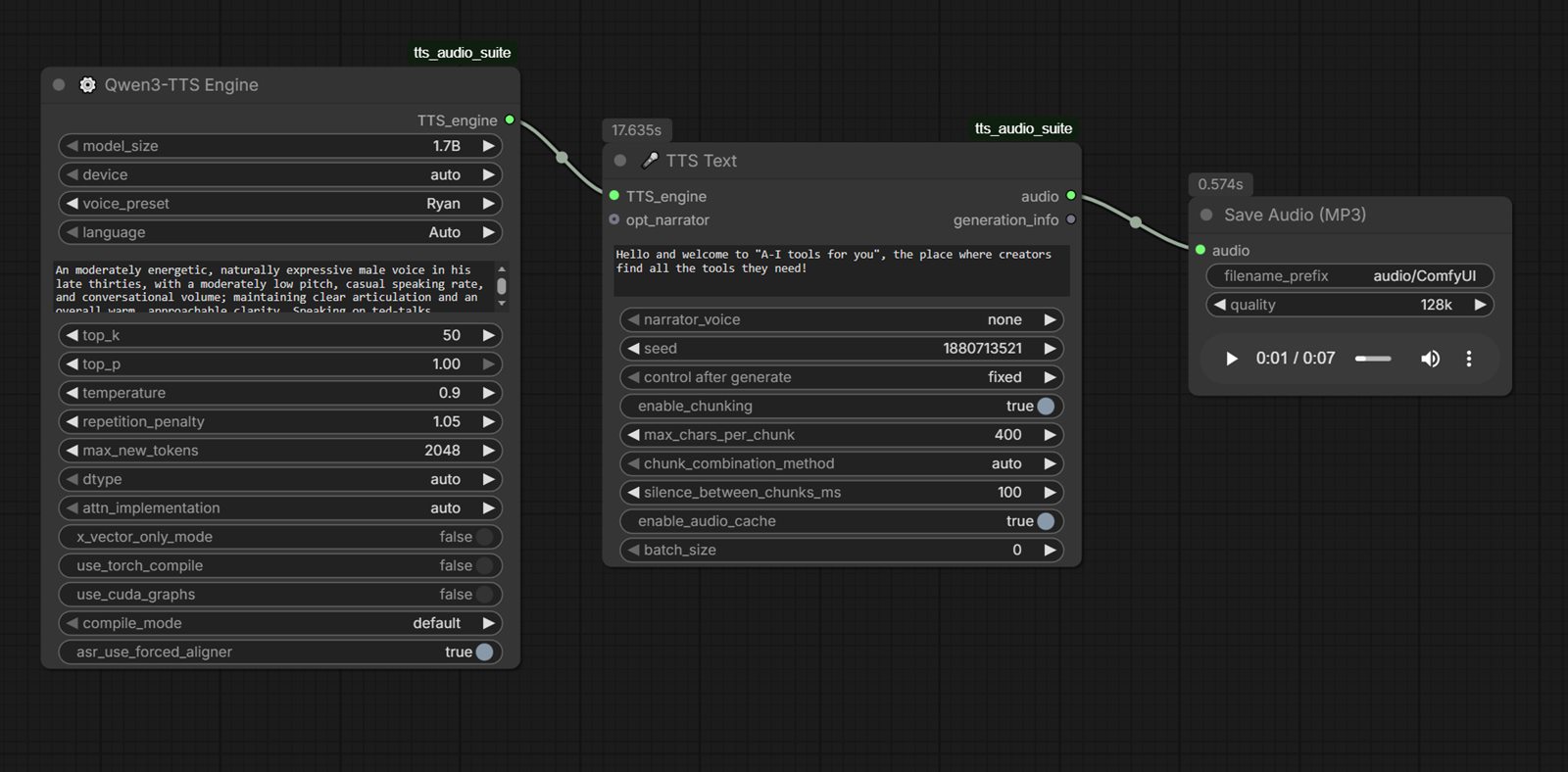
If your stack includes Qwen3-compatible speech or multimodal nodes, you can run Qwen3 as the text/planning stage and then pass output into TTS/voice-conversion nodes for final audio.
- Official release blog: https://qwen.ai/blog?id=qwen3tts-0115&utm_source=aitoolsfor.you
- Official repo: https://github.com/QwenLM/Qwen3-TTS?utm_source=aitoolsfor.you
- Model collection: https://huggingface.co/collections/Qwen/qwen3-tts?utm_source=aitoolsfor.you
- Common pattern:
- Qwen3 node generates or rewrites spoken script.
- TTS node renders base narration.
- Voice-conversion/switch node applies target speaker style.
- Loudness + denoise node finalizes output for publishing.
Qwen3-TTS Variants to Use in Comfy Workflows
Qwen3-TTS-12Hz-1.7B-VoiceDesign:- For creating voice style from natural-language voice descriptions.
Qwen3-TTS-12Hz-1.7B-CustomVoice:- Includes style control with preset premium timbres.
Qwen3-TTS-12Hz-1.7B-Base:- Strong base model, supports rapid voice cloning from short reference audio.
Qwen3-TTS-12Hz-0.6B-CustomVoice:- Lighter/faster option with preset timbre support.
Qwen3-TTS-12Hz-0.6B-Base:- Lower resource baseline for lightweight deployments.
For voice switching, quality depends on clean reference audio, model choice, and conversion strength settings.
Voice Switching Presets (Starter)
Use these preset profiles as starting points, then tune by ear:
-
Neutral Narrator
- Use case: tutorials, explainers
- Speed: 0.95-1.0
- Pitch shift: 0 to +1 semitone
- Conversion strength: low-medium
- Denoise: low
-
Energetic Creator
- Use case: shorts, promos, hooks
- Speed: 1.05-1.12
- Pitch shift: +1 to +2 semitones
- Conversion strength: medium
- Compression: medium
-
Deep Authority
- Use case: business voiceover, narration
- Speed: 0.9-0.98
- Pitch shift: -1 to -3 semitones
- Conversion strength: low-medium
- De-esser: medium
-
Soft Conversational
- Use case: podcast-style social clips
- Speed: 0.96-1.02
- Pitch shift: 0
- Conversion strength: low
- Room tone/noise: very low
-
Character Stylized
- Use case: animated or persona content
- Speed: 1.0-1.08
- Pitch shift: +/-2 to +/-4 semitones
- Conversion strength: medium-high
- Post-EQ: required for intelligibility
Qwen3 CustomVoice variants provide preset premium timbres (the exact preset names/options can vary by implementation UI and node package).
Start with lower conversion strength, then increase gradually to avoid metallic artifacts.
Practical Installation Notes
- Start with ComfyUI Manager for node installation: https://github.com/ltdrdata/ComfyUI-Manager?utm_source=aitoolsfor.you.
- Add one node pack at a time and validate with a short sample workflow before stacking multiple TTS packs.
- Keep environment notes (Python version, CUDA/PyTorch versions, node commit/version) to avoid breakage after updates.
Product screenshots
Comparison table
| Tool | Pricing | Page type | Model source | Price range | API cost | Subscription cost | Pros | Cons |
|---|---|---|---|---|---|---|---|---|
| ComfyUI TTS | Free | Open-source project | 3rd-party models | Free (open-source) | No required vendor API cost for local/self-hosted use. | No mandatory subscription for the open-source local workflow; hosted runtimes and third-party models can add separate cost. | Full node-level control for reusable speech workflows; Strong custom-node ecosystem for multiple TTS model families | Setup and dependency management can be technical; Node compatibility and model updates require maintenance |
| Voxtral TTS | Credits | Product/service | Own models | Pay-as-you-go API | Mistral lists Voxtral TTS at $0 input / $16 output per 1M characters. | No mandatory subscription is listed on the model page; usage is pay-as-you-go through Mistral API. | Zero-shot voice cloning needs very short reference audio; Low latency is attractive for real-time voice agents | No local/offline path on the official release; API usage cost can add up for heavy narration volumes |
| Coqui TTS | Free | Open-source project | 3rd-party models | Free (open-source) | No required vendor API cost for local/self-hosted use. | No mandatory subscription for base model access. | Broad feature set for custom TTS workflows; Local deployment and automation friendly | Higher setup complexity for non-technical users; Quality and latency vary by model and hardware |
| Piper TTS | Free | Open-source project | 3rd-party models | Free (open-source) | No required vendor API cost for local/self-hosted use. | No mandatory subscription for base model access. | Fully local and offline voice generation; Lightweight runtime suitable for automation pipelines | Voice quality varies by selected model/voice pack; Setup is more technical than hosted TTS apps |
| Kokoro TTS | Free | Open-source project | 3rd-party models | Free (open weights) | No required vendor API cost for local/self-hosted use. | No mandatory subscription for base model access. | Small model footprint for local usage; Open-weight flexibility for custom pipelines | Requires model/runtime setup and tuning; Fewer turnkey UX features than hosted products |
| Voicebox | Free | Open-source project | 3rd-party models | Free (open-source) | No required vendor API cost for local/self-hosted use. | No mandatory subscription for base model access. | Full local-first control over voice assets and generation workflow; Strong fit for voice cloning and multi-voice composition | Setup quality depends on local hardware and model configuration; Early-stage project cadence can introduce workflow changes |
| ElevenLabs | Freemium | Product/service | Own models | Free-$330+/mo | Usage-based API pricing is available; total cost depends on model, character volume, and selected plan. | Free tier available; paid subscriptions unlock higher limits, cloning depth, and team features. | Fast setup for solo teams; Useful template support for repeatable workflows | Costs can increase with higher usage; Output quality depends on prompt quality |
| Murf | Subscription | Product/service | Own models | $29-$99+/mo | API access is plan-dependent; usage and integration pricing depend on the selected business tier. | Paid subscription required for sustained production use; pricing starts with standard creator/business plans. | Fast setup for solo teams; Useful template support for repeatable workflows | Costs can increase with higher usage; Output quality depends on prompt quality |
Internal links
Related best pages
- Best AI Voiceover Tools
- Best AI Tools for YouTube Shorts
- Best AI Video Repurposing Tools
- Best AI Script Generators